What is the secret to extreme laptop longevity?
Extreme laptop longevity is achieved by keeping internal components within their “Elastic Zone” through a three-pillared engineering approach: Thermal Mitigation (using 32GB of RAM to prevent SSD/CPU heat spikes), Structural Integrity (choosing High-Tg motherboards with underfill epoxy), and Active Maintenance (undervolting and biennial thermal paste replacement). By managing the Coffin-Manson relation, users can extend a laptop’s functional life from the industry-standard 3 years to over a decade.
The Reliability Physics of the “Death Clock”
Most users view a laptop failure as “bad luck” or a random event. In reality, hardware death is a predictable metallurgical process known as Fatigue Thermomécanique (thermomechanical fatigue). Every time your laptop heats up to 90°C and cools back down, the internal materials expand and contract at different rates.
This “tug-of-war” between the silicon chips and the motherboard is governed by the Coffin-Manson relation. It calculates how many thermal cycles a solder joint can withstand before it physically snaps. To engineer a 10-year PC, you must minimize the magnitude of these temperature swings (Delta T) to keep the hardware in the “Elastic Zone”—where materials return to their original shape without permanent micro-fractures.
The Thermal Shield: Why 32GB RAM is a Longevity Requirement
The most overlooked component of laptop longevity is RAM capacity. While 16GB is often cited as “enough” for performance, it is insufficient for thermal protection.

When a system runs out of physical memory, it initiates “swapping” or “paging”—forcing the CPU and SSD to work in a high-energy, high-latency loop. This process generates intense Joule Heating (P = I2R) within the SSD and CPU voltage regulators. By upgrading to 32GB of LPDDR5X RAM, you provide a sufficient buffer that prevents these high-heat transients. As detailed in our 32GB RAM thermal protection guide, this capacity shift can reduce internal chassis temperatures by as much as 15°C during heavy multitasking, significantly slowing the degradation of the motherboard’s “atomic glue.”
The Structural Foundation: Business Class vs. Consumer Builds
If you want a laptop to survive 100,000 hours (approx. 11 years), you must look at the physical architecture of the motherboard. Most consumer laptops are built to IPC Class 2 standards using standard FR-4 laminates. These boards begin to warp (the “Glass Transition” point) at relatively low temperatures.
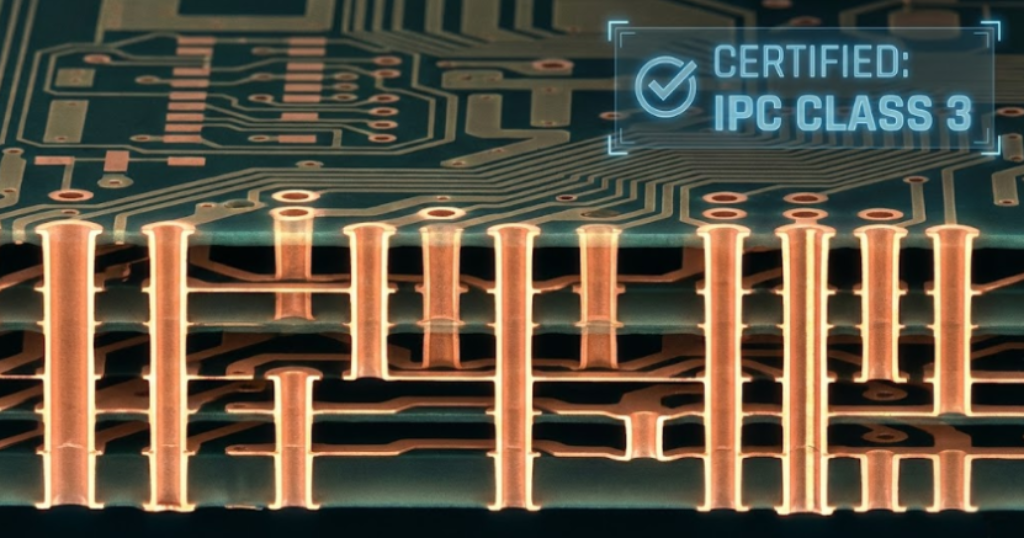
Business-class systems (like ThinkPads or Precision workstations) utilize:
- High-Tg Laminates: PCBs that stay rigid up to 180°C.
- Underfill Epoxy: A resin injected under the CPU/GPU that acts as a mechanical shock absorber for the solder joints.
- IPC Class 3 Standards: The same manufacturing rigor used in medical and aerospace electronics.
Choosing a device with these reinforcements ensures the motherboard doesn’t “potato chip” (warp) over years of thermal stress, preventing the motherboard solder joint failures that plague thinner consumer models.
The Maintenance Protocol: Undervolting and the 24-Month Rule
Even the best-built laptop will fail if the “thermal bridge” between the chip and the heatsink collapses. This bridge is the Thermal Interface Material (TIM), which is prone to “pump-out” and “dry-out” over time. To achieve a 10-year lifespan, you must replace your thermal paste every 24 months.
Furthermore, you should utilize undervolting techniques to lower the electrical “pressure” on your silicon. Reducing the core voltage lowers heat and slows Electromigration—the process where atoms are physically moved by electricity, creating “voids” in your circuits.
Frequently Asked Questions (FAQ)
Yes, provided you start with a high-performance baseline (like a modern i7/Ryzen 7 and 32GB RAM). Modern CPU performance has plateaued enough that a top-tier machine from today will likely handle office, web, and AI-assisted tasks well into the 2030s.
Not necessarily, but it changes the “risk profile.” Since you cannot upgrade or easily fix a failed chip, you must buy the capacity you need (32GB) on day one. Understand that a soldered failure often results in a $600 motherboard tax because most shops will only perform a full board swap.
While rare, sustained high internal temperatures can lead to thermal runaway, where a battery cell failure triggers a chain reaction. Proper thermal management isn’t just about longevity; it’s about safety.
Conclusion: Breaking the 3-Year Upgrade Cycle
The industry wants you to replace your laptop every 36 months. By understanding the science of laptop longevity, you can break that cycle. By prioritizing 32GB of RAM, choosing business-class durability, and maintaining your thermal interface, you transform your computer from a disposable gadget into a decade-long investment.
Your hardware doesn’t have an expiration date—it only has a thermal budget. Spend it wisely.