Which keyboard layout is best for you?
For most users, the standard ANSI layout is the ideal choice for its wide compatibility and intuitive key placement. However, if you experience wrist pain or heavy typing workloads, transitioning to an ergonomic split keyboard or an alternative logical layout like Colemak can reduce finger travel by over 60% and significantly lower the risk of repetitive strain injuries.
The Science of Keyboard Layouts: A Data-Driven Guide to Comfort and Speed
If you’ve ever felt a dull ache in your wrists after a long day of typing or wondered why the “Enter” key on your new keyboard looks different, you aren’t alone. Most of us are using tools designed for the 1870s to do 21st-century work. The standard keyboard you use today wasn’t designed for speed; it was designed to prevent mechanical typewriter levers from jamming. This “lock-in” effect has left modern consumers with a “standard” that prioritizes historical momentum over human health. This guide breaks down the biomechanics and engineering of keyboard layouts to help you choose a tool that actually fits your body.
💰Save More with Our Discounts & Coupons!


Why is the QWERTY Layout Still the Standard?
The QWERTY keyboard layout is a 19th-century solution to a mechanical problem that no longer exists. Created by Christopher Sholes, the arrangement deliberately placed frequently used letter combinations far apart to slow down typists, preventing the mechanical bars of early typewriters from tangling.
Snippet Bait: QWERTY vs. Efficiency
- Origin: 1870s typewriter mechanics.
- Primary Goal: To prevent hardware jams by slowing down typists.
- Home Row Usage: Only 32% to 33.9%.
- Finger Travel: An average of 16–20 miles per workday.
- The Problem: High “same-finger” combinations (35.9%) create typing friction and speed bottlenecks.
While we no longer use mechanical levers, the QWERTY system became entrenched because the cost of retraining the global workforce was deemed too high. This created a “lock-in” effect where ubiquity triumphed over efficiency. Modern users now face the “staggered column layout,” a legacy of those old mechanical levers that forces fingers into unnatural diagonal reaches, contributing to repetitive strain.
Which “Logical” Layout is Most Efficient?
When buying a keyboard, you must distinguish between the physical structure and the “logical” mapping—the software that tells the computer which letter you pressed. Several alternatives have emerged to fix QWERTY’s inefficiencies.
The Dvorak Simplified Keyboard
Patented in 1936, the Dvorak layout was built on the study of letter frequency and hand physiology. It places all vowels on the left side of the home row and the most common consonants on the right.
- The Benefit: Dvorak users perform 70% of their keystrokes on the home row, compared to QWERTY’s 33%.
- The Result: A Dvorak typist’s fingers travel only about one mile a day, versus the 16–20 miles traveled by a QWERTY user.
💰Save More with Our Discounts & Coupons!


The Colemak and Workman Alternatives
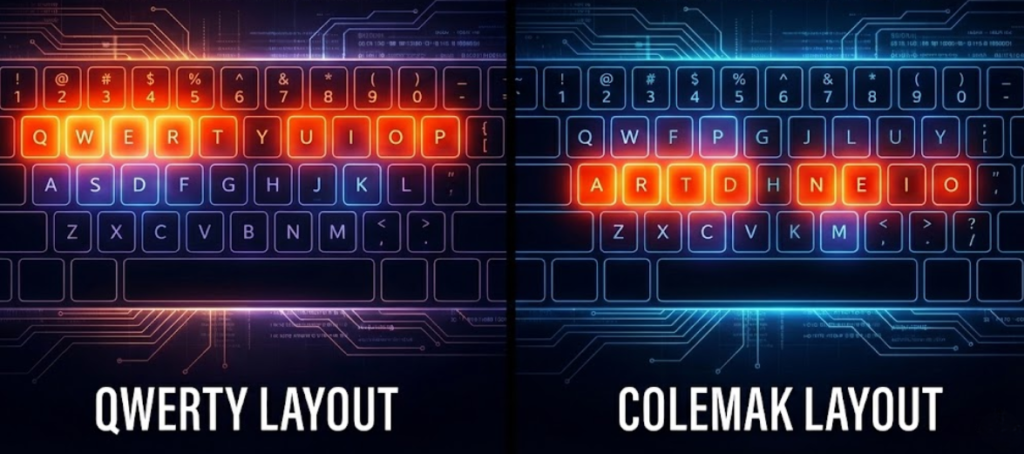
For many, Dvorak is too radical because it moves essential shortcuts like “Undo” (Ctrl+Z) and “Copy” (Ctrl+C). Colemak solves this by making only 17 changes to QWERTY and preserving the “ZXCV” cluster.
- Colemak Efficiency: It achieves a home row usage of 72.4%, even higher than Dvorak.
- Workman Layout: Further refines these principles by minimizing “lateral stretches”—the uncomfortable sideways reaching of fingers.
Science Fact: Switching to a layout like Colemak can reduce “same-finger” combinations from 35.9% to roughly 31.2%, significantly reducing muscle fatigue during long sessions.
What is the Difference Between ANSI, ISO, and JIS?
Beyond the letters on the keys, regional standards dictate the physical shape of your keyboard. Understanding these is critical for typing accuracy and finding custom replacement parts.
Comparison of Physical Standards
| Feature | ANSI (American) | ISO (International) | JIS (Japanese) |
| Primary Region | North America, Asia-Pacific | Europe, UK | Japan |
| Enter Key | Horizontal (1 unit high) | L-Shaped (2 units high) | L-Shaped (2 units high) |
| Left Shift | Wide (2.25u) | Narrow (1u) | Wide (varies) |
| Key Count | 104 | 105 | 106–109 |
Why it matters: Programmers often prefer ANSI because brackets and backslashes are in more intuitive positions. However, ISO is essential for multilingual users who need access to the “Alt Gr” key for special symbols and currency signs like the Euro (€).
How Does Keyboard Width Affect My Shoulders?
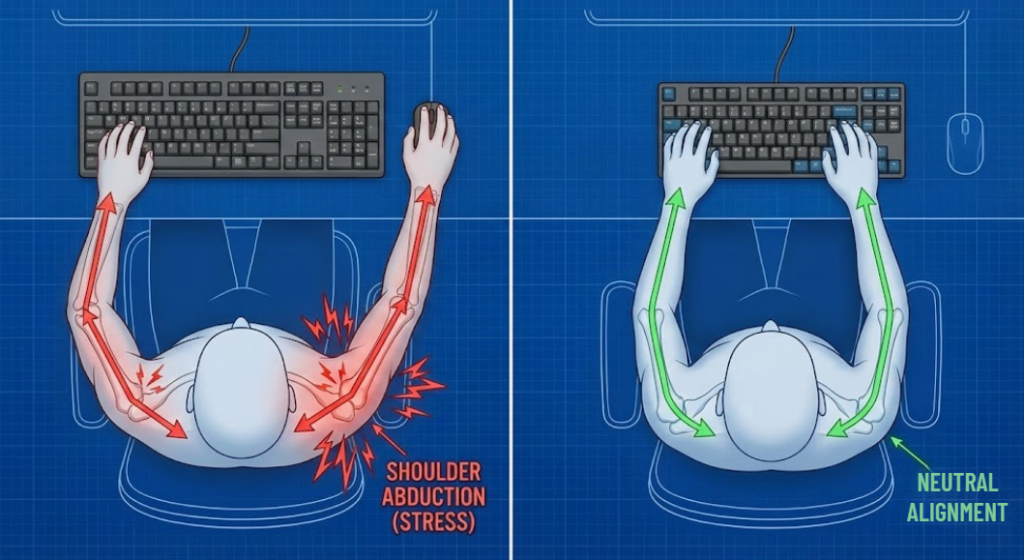
One of the most overlooked ergonomic factors is the “Aiming Triangle”—the relationship between your shoulders and your mouse.
Traditional full-size keyboards include a numeric keypad (numpad) on the right, which adds 4 to 6 inches to the width. For right-handed users, this forces the shoulder into “abduction”—an outward rotation that causes tension in the deltoid and trapezius muscles.
Finding Your “Sweet Spot” based on Hand Gap
- Hand Gap < 300 mm: Choose a 60% or 65% layout to minimize abduction.
- Hand Gap 300–380 mm: A 75% or TKL (Tenkeyless) layout is your ergonomic “sweet spot”.
- Hand Gap > 400 mm: A full-size board is acceptable, though TKL still provides more room for mouse movement.
Pro Tip: Removing the 120 mm numpad section can reduce shoulder abduction by 5 to 10 degrees, effectively eliminating the “aim jitter” caused by muscle fatigue.
💰Save More with Our Discounts & Coupons!


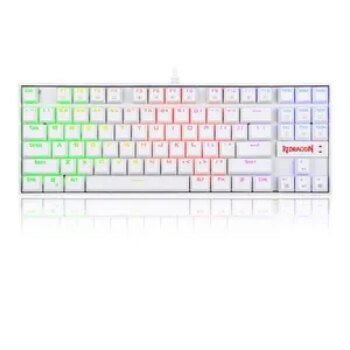
Are Split and Ortholinear Keyboards Actually Better?
Standard keyboards are an “ergonomic paradox” because their staggered keys require unnatural postures for rapid movement.
Split Keyboards and Neutral Positioning
Flat keyboards force wrists into “Ulnar Deviation” (bending outward) and “Wrist Extension” (bending upward). These positions can increase internal carpal tunnel pressure by 2 to 6 times. Split keyboards allow your hands to rest at shoulder-width, eliminating these harmful angles.
Ortholinear vs. Staggered
On a standard keyboard, you move diagonally from ‘D’ to ‘E’. Ortholinear keyboards arrange keys in a perfect grid, meaning your fingers only move in straight vertical lines.
- Thumb Utilization: Ergonomic designs move high-frequency keys like Enter and Backspace to a center cluster for the thumb.
- The Result: Moving these tasks to the thumb can reduce localized muscle fatigue by up to 45%.
Which Keyboard Switch Technology Should I Choose?
The “feel” of your keyboard is determined by the switch and the mounting plate. This affects both tactile satisfaction and long-term joint health.
Comparison of Switch Types
- Mechanical Switches: Individual mechanisms rated for 50–100 million clicks. They allow you to feel the “actuation point,” helping you avoid “bottoming out” with excessive force.
- Membrane Keyboards: Use a rubber dome layer. They are quieter but often feel “mushy” and last only 5–10 million strokes.
- Scissor Switches: Found in laptops; they offer a crisper feel than standard membrane but have short travel distances that can lead to higher fingertip impact and fatigue.

The Role of Mounting Plate Materials
The “spine” of the keyboard influences its stiffness, measured by Young’s Modulus (E):
- Steel Plates: Extreme rigidity; preferred by high-APM gamers for immediate feedback.
- Aluminum Plates: Act as a microscopic shock absorber; ideal for long typing sessions.
- Polycarbonate/FR4: Offer a “bouncier” feel and a muted, “thocky” sound profile.
💰Save More with Our Discounts & Coupons!

The “Laptop Trap”: How to Avoid Neck and Wrist Pain
The widespread use of the “laptop layout” has created a unique ergonomic crisis. Because the screen and keyboard are attached, you are forced into a trade-off: if the keys are at the right height for your hands, the screen is too low, straining your neck.
Acute Median Nerve Swelling
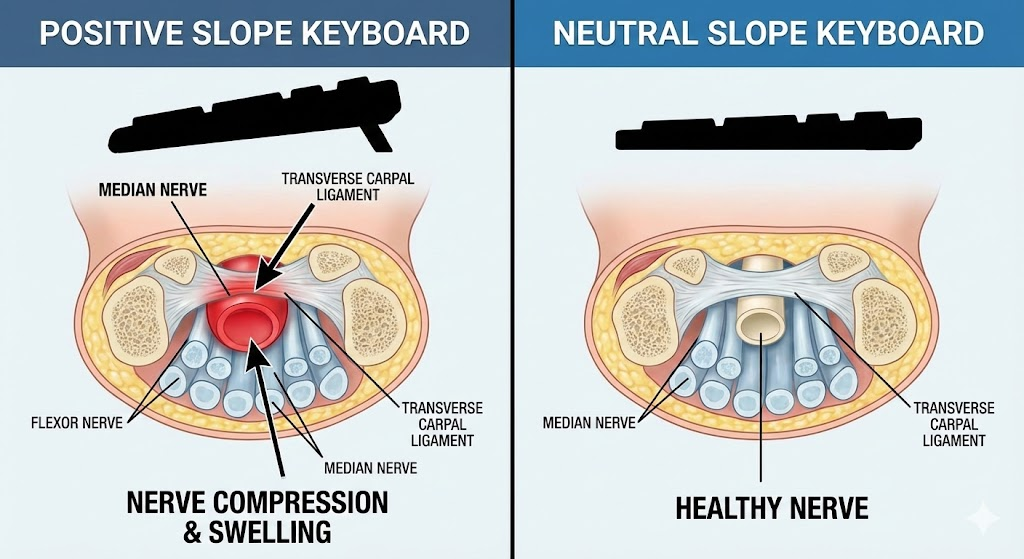
Biomechanical studies using ultrasound have measured the Median Nerve Cross-Sectional Area (MNCSA). Research shows that typing on a keyboard with a positive slope (tilted up at the back) causes significantly more swelling of the median nerve than a neutral (0°) slope. While the nerve usually recovers in 30 minutes, years of this exposure can lead to chronic carpal tunnel syndrome.
The Solution: Using an external keyboard and a laptop stand significantly reduces RULA (Rapid Upper Limb Assessment) scores and typing errors.
Frequently Asked Questions (FAQ)
Yes, because mechanical switches provide tactile feedback at the “actuation point,” allowing typists to avoid “bottoming out” the keys with excessive force, which reduces joint impact.
The results are mixed. While some individuals reach 160 WPM, academic studies show only marginal improvements (approx. 2.6% faster) after 100+ hours of training. The main benefit is comfort and reduced finger travel, not necessarily raw speed.
In high-humidity environments (above 70% humidity), standard steel springs can oxidize and feel “scratchy”. Gold does not oxidize, preserving a smooth feel and dampening high-frequency “ping” sounds.
A 75% layout is a compact board that removes the numeric keypad but keeps the dedicated arrow keys and the function row. It is considered the “ergonomic sweet spot” for balancing functionality with reduced shoulder strain.
Most users experience a significant speed drop for the first few weeks. It typically takes about three months of consistent use to exceed your previous QWERTY proficiency.
Summary of Findings
Choosing a keyboard is a fundamental decision in human-machine interaction. While QWERTY remains the global baseline, it is far from the most efficient or healthy option. For the modern consumer:
- Prioritize a TKL or 75% layout to protect your shoulders.
- Consider a split ergonomic board if you have existing wrist strain.
- Opt for aluminum or FR4 plates if you are a “heavy-handed” typist to protect your finger joints.
By looking beyond the letters on the keycaps and understanding the underlying structure, you can ensure your most-used tool is an asset to your health, not a liability.