Is a business-class laptop actually more durable than a consumer model?
Yes. While consumer laptops are engineered for a 3-to-5-year lifecycle, business-class hardware is designed for a Mean Time Between Failures (MTBF) of 100,000 hours (approx. 11 years). This durability is achieved through physical hardware reinforcements—specifically High-Tg laminates that resist warping at high temperatures and underfill epoxy that prevents solder joints from cracking under mechanical stress.
The MTBF Benchmark: Quantifying the 11-Year Lifespan
In the world of reliability engineering, the most critical metric isn’t the CPU speed; it is the Mean Time Between Failures (MTBF). While a standard home laptop is designed for intermittent use, business-class systems—such as those found in mission-critical workstations—are engineered for 100,000 hours of continuous operation.
This 11.4-year benchmark represents the “useful life” before the statistical probability of a hardware failure begins to rise sharply. Achieving this requires components that can handle the “power-on” state indefinitely without the silicon degrading or the board warping. For professionals, this reliability is the difference between a tool that earns revenue and a device that incurs a $600 “Motherboard Tax.”
High-Tg Laminates: The Foundation of Heat Resistance
The most common point of failure in a laptop is the Printed Circuit Board (PCB) itself. Standard PCBs use FR-4 material with a “Glass Transition Temperature” (Tg) of roughly 130°C. Once the board nears this temperature during heavy workloads, the epoxy softens, causing the board to expand at a rate that the copper circuits cannot match.
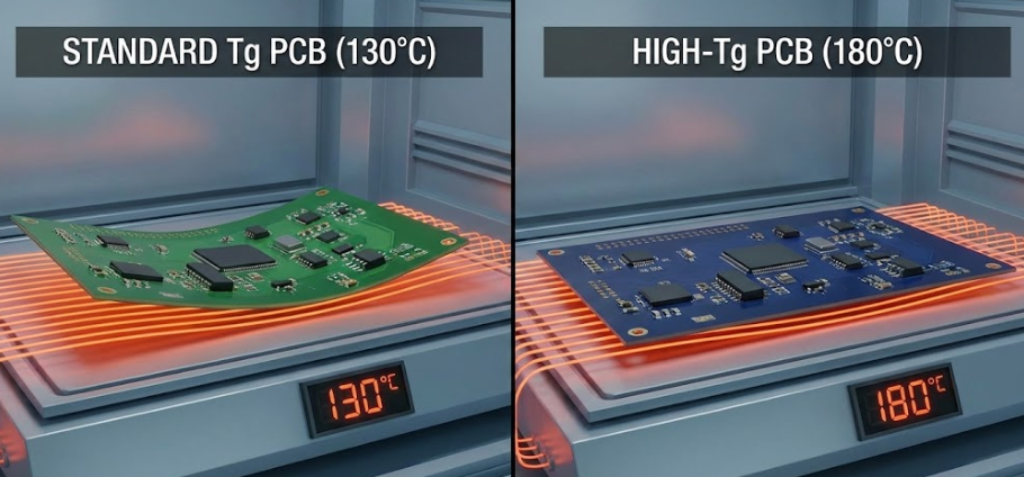
Business-class motherboards utilize High-Tg laminates (170°C – 180°C). By raising this threshold, the board remains rigid even during the “thermal transients” we discussed in our laptop lifespan engineering guide. This rigidity prevents the microscopic “pad cratering” that often kills consumer laptops after just three years of heavy thermal cycling.
Underfill Epoxy: The Invisible Shield for Solder Joints
Even if the board is rigid, the heavy chips (like the CPU and GPU) are held on by fragile solder balls. In a consumer laptop, a single drop or a hard bump can snap these connections. Business-class hardware mitigates this through Underfill Epoxy Encapsulation.
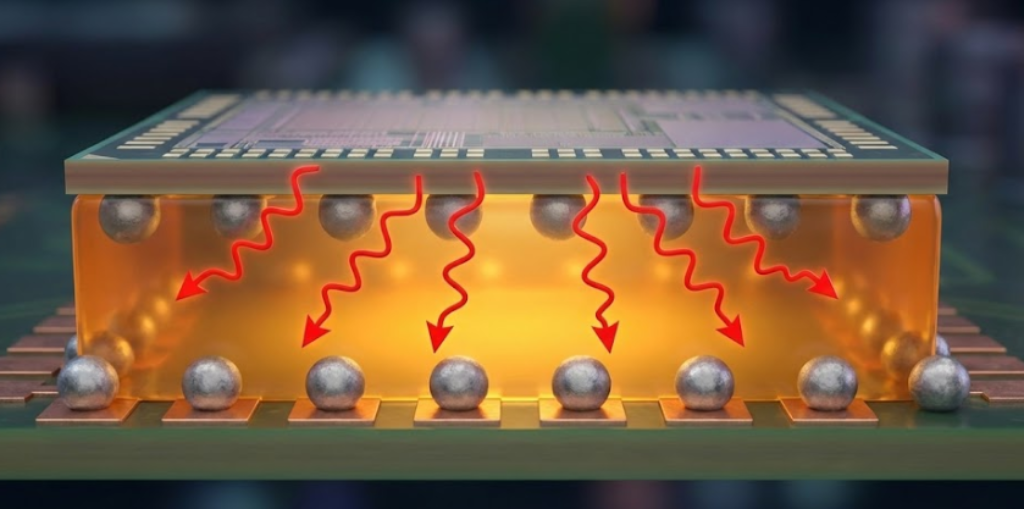
After the chip is soldered, a specialized resin is injected underneath it. This underfill acts as a mechanical “shock absorber” that distributes stress across the entire surface of the chip rather than letting it concentrate on individual solder balls. This is a primary reason why devices pass MIL-SPEC Testing for durability; the underfill ensures that the “Ball Grid Array” (BGA) can withstand vibrations and drops that would shatter a standard consumer device.
IPC Class 3: The “Professional Grade” Manufacturing Standard
Most consumer electronics are built to IPC Class 2 standards, which allow for certain microscopic imperfections in the soldering and board alignment. Business-class hardware, however, often adheres to IPC Class 3—the same standard used for medical life-support systems and aerospace equipment.
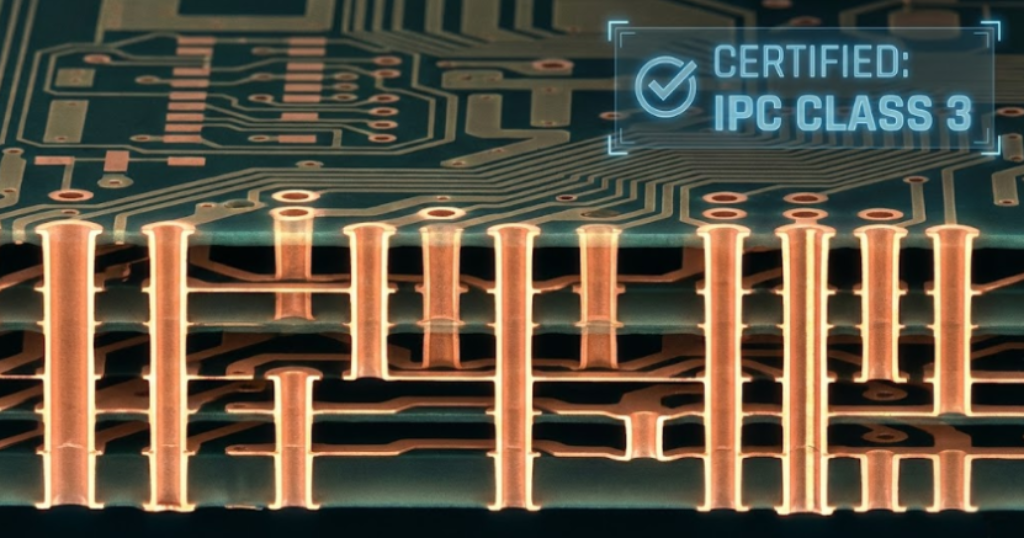
Class 3 requirements include:
- Zero-Defect Plating: The copper in the “vias” (the holes connecting board layers) is thicker and more uniform.
- Solder Fillet Precision: Solder must wrap further around the component to ensure a “perfect” mechanical bond.
- Rigid Inspection: These boards undergo X-ray and automated optical inspection (AOI) to ensure no internal voids exist.
By choosing hardware built to Class 3 standards, you aren’t just buying a brand name; you are buying a motherboard that has been physically verified to survive the most demanding electrical and thermal environments.
Frequently Asked Questions (FAQ)
Not necessarily. Many gaming laptops prioritize “raw specs” (GPU speed) over “build grade” (High-Tg boards). While they have better cooling, they may still use IPC Class 2 boards that can warp over time. True business-class machines (like ThinkPads or Precision workstations) prioritize the motherboard’s physical integrity over peak frame rates.
Usually, yes. If you open the laptop, you will see a thin line of black or grey hardened resin around the edges of the largest chips on the motherboard. If the chips sit “naked” on the board with no visible glue around the base, the device lacks underfill protection.
If you plan to keep the laptop for more than 4 years, the ROI is clear. A $1,200 business laptop lasting 8 years costs $150/year, whereas a $900 consumer laptop lasting only 3 years costs $300/year.
Conclusion: Why Build Grade is Your Best Insurance
Longevity isn’t an accident; it is an engineering choice. While high RAM capacity protects your hardware from thermal runaway, and undervolting protects the silicon, the High-Tg and Underfill choices protect the physical skeleton of your computer.
When shopping for your next device, look beyond the “Core i7” sticker. Ask about the IPC manufacturing class and the thermal rating of the PCB. In the long run, the most expensive laptop is the one that breaks in 36 months.