If you spend hours at a desk, you’ve probably felt it: that creeping ache in your wrists, the stiffness in your hands, or the tension in your shoulders. It’s a modern problem that leads many to ask, are ergonomic mechanical keyboards worth it?
The answer is a definitive yes. For anyone who types extensively, an ergonomic keyboard is one of the best investments you can make for your long-term health, comfort, and productivity.
Dealibrium’s Quick Verdict
Many of the best ergonomic models are mechanical, as they provide superior feedback and durability. However, the core benefit comes from the keyboard’s shape. By promoting a natural hand and wrist posture, all ergonomic designs directly combat the strain that causes chronic pain and Repetitive Strain Injuries (RSI).
The answer is a definitive yes. For anyone who types extensively, an ergonomic mechanical keyboard is one of the best investments you can make for your long-term health, comfort, and productivity. By promoting a natural hand and wrist posture, these keyboards directly combat the strain that causes chronic pain and repetitive strain injuries (RSI).
This guide will break down the essential benefits of an ergonomic mechanical keyboard, explain the science behind why they work, and help you decide if it’s the right upgrade for you.
💰Save More with Our Discounts & Coupons!
- 1
- 2
- 3
- …
- 7
- Next Page »
What are Ergonomic Mechanical Keyboards?
An ergonomic mechanical keyboard combines two powerful features: a health-focused design and a superior typing experience.
- Ergonomic Design: This refers to the physical shape of the keyboard, which is engineered to reduce muscle strain. Features like split layouts, tenting angles, and curved frames encourage a more natural posture for your hands, wrists, and forearms.
- Mechanical Switches: Unlike standard membrane keyboards, mechanical keyboards use individual physical switches under each key. This provides a more tactile, responsive, and precise typing feel, which many users find increases their accuracy and overall comfort.

Here’s a quick comparison of how they stack up against traditional keyboards.
| Feature | Ergonomic Mechanical Keyboard | Traditional Membrane Keyboard |
|---|---|---|
| Primary Goal | Promote a healthy, natural posture and reduce strain | Basic text input |
| Layout Design | Split, curved, and/or tented | Flat and rectangular |
| Typing Feel | Tactile, responsive, and precise | Mushy, soft, or unresponsive |
| Key Health Benefit | Actively reduces risk factors for RSI and pain | Can contribute to strain and injury |
| Productivity | Enhances long-term focus and comfort | Can cause fatigue and discomfort |
| Price Point | Higher initial investment | Low cost |
💰Save More with Our Discounts & Coupons!
- 1
- 2
- 3
- …
- 7
- Next Page »
Who Should Use an Ergonomic Keyboard?
While anyone who types can benefit from improved comfort, certain users will see a dramatic improvement in their health and productivity by switching to an ergonomic keyboard.
- Office Workers, Writers, and Programmers: If you type for a living, you are the prime audience. Research shows that using a computer for more than 15 hours per week significantly increases the risk of developing musculoskeletal disorders (MSDs). For full-time professionals who can spend 30 hours or more on a keyboard weekly, an ergonomic design is a critical tool for a long, pain-free career.
- Anyone with Existing Wrist Pain or Discomfort: If you already feel that familiar ache in your wrists, hands, or forearms, an ergonomic keyboard is one of the most effective preventative tools you can buy. It’s specifically designed to combat the factors that cause Repetitive Strain Injuries (RSI) like tendonitis and Carpal Tunnel Syndrome. In fact, studies have shown that users with an ergonomic keyboard can experience significant improvements in upper body comfort over time by reducing pressure on the median nerve and correcting poor posture.
3 Core Benefits of Ergonomic Keyboards
People seek out these keyboards because they are experiencing pain or want to prevent it. Here’s exactly how an ergonomic mechanical keyboard delivers on its promise of greater comfort and health.

1. Improves Your Posture and Reduces Wrist Strain
The biggest benefit comes from placing your body in a more natural position. Traditional keyboards force you to twist your hands and forearms in two unnatural ways:
- Ulnar Deviation: Bending your wrists outward to reach the keys.
- Forearm Pronation: Twisting your forearms to lay your palms flat.
An ergonomic keyboard is specifically designed to correct this. A split layout allows you to separate the keyboard halves to match your shoulder width, keeping your wrists perfectly straight. Features like “tenting” raise the center of the keyboard, putting your hands in a more neutral “handshake” posture. These design adjustments are critical for reducing the constant strain that leads to pain and fatigue. A cushioned wrist rest further promotes this neutral posture to prevent injury.
2. Helps Prevent Repetitive Strain Injuries (RSI)
Repetitive Strain Injuries, including conditions like Carpal Tunnel Syndrome and tendonitis, are a serious risk for heavy computer users. These injuries develop over time from making the same harmful motions again and again.
By encouraging a healthier posture, an ergonomic keyboard is one of the most effective tools for RSI prevention. The design philosophy is simple: if the keyboard fits your body, your body doesn’t have to contort to fit the keyboard. This dramatic reduction in muscle and tendon stress is crucial for anyone looking to build a sustainable, pain-free career at their desk.
3. Boosts Long-Term Productivity and Comfort
While there’s often a short adjustment period, the long-term impact on your productivity is significant. When you aren’t fighting discomfort or stopping to stretch sore wrists, you can maintain focus for longer periods. This enhanced comfort is a direct path to more efficient work.
Furthermore, the crisp, tactile feedback of a mechanical keyboard can lead to higher typing accuracy and speed. Less time spent correcting typos means more time spent on productive tasks. Over weeks and years, this sustained comfort and efficiency make a massive difference.
💰Save More with Our Discounts & Coupons!
- 1
- 2
- 3
- …
- 7
- Next Page »
Understanding Keyboard Ergonomics: The Key to Comfort
What actually makes a keyboard “ergonomic”? It comes down to a few scientific principles designed to align the keyboard with your body, not force your body to conform to the keyboard.
Flat vs. Tilted: How Should Your Keyboard be Positioned?
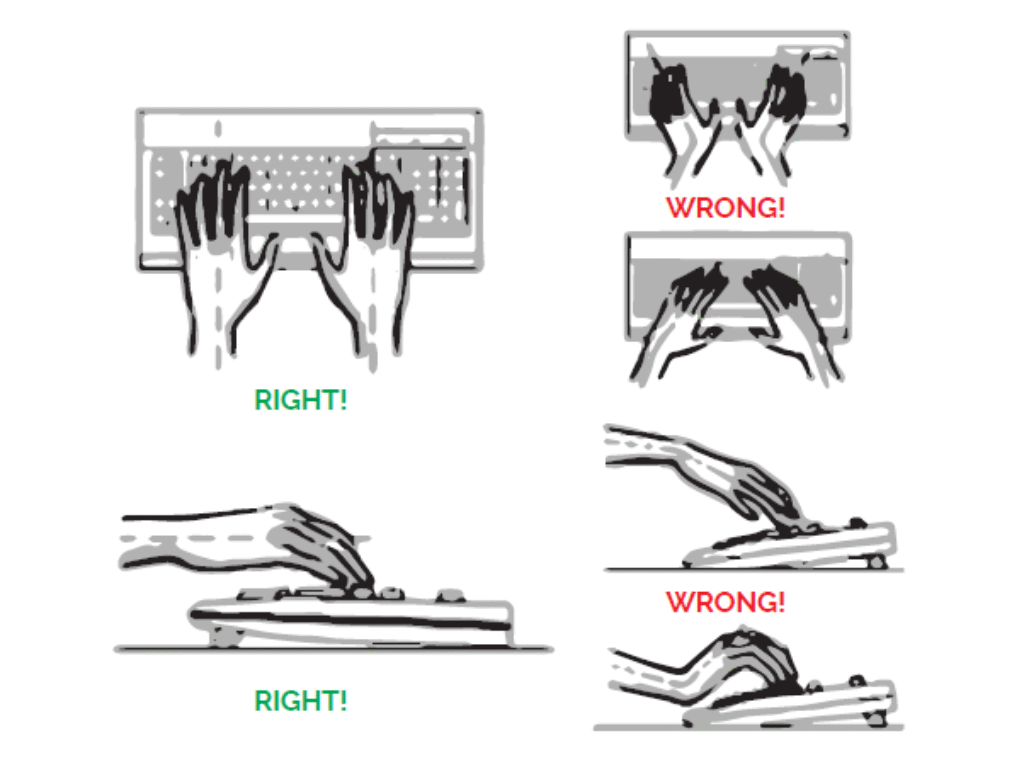
The single biggest ergonomic mistake most people make is using the pop-up feet on their keyboard. The goal is to keep your wrists in a neutral position—straight and level with your forearms.
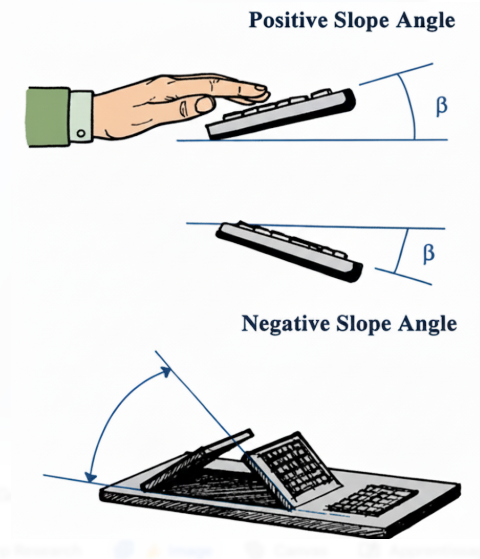
- The Problem: Positive Tilt. Those little feet create a positive tilt, angling the keyboard up towards you. This forces you to bend your wrists upward to reach the keys, causing strain.
- The Solution: Negative Tilt or Flat Position. For optimal health, your keyboard should either lie completely flat or have a negative tilt (angled slightly away from you). Research shows a negative angle of -7.5° can create a near-perfect neutral wrist posture, reducing pressure on critical tendons.
The Truth About Split Keyboards
Split keyboards directly address one of the most harmful postures forced by traditional keyboards: ulnar deviation.
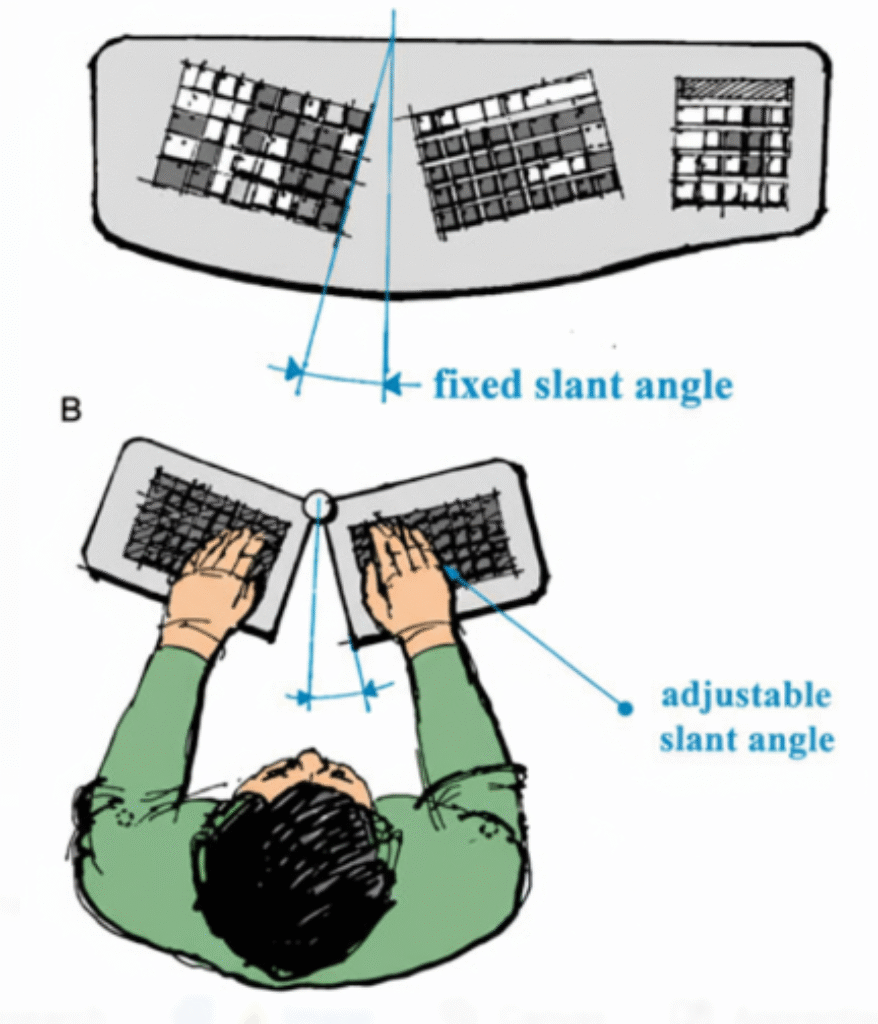
- The Problem: Ulnar Deviation. A standard rectangular keyboard forces your hands close together, causing you to bend your wrists outward to align your fingers with the keys. This unnatural outward bend is called ulnar deviation and places constant stress on your wrist.
- The Solution: Splitting the Keyboard. A split keyboard corrects this by allowing you to separate the two halves to match your shoulder width. This keeps your forearms and wrists in a straight, natural line. Studies show that a split or curve with a 12-13° opening angle is highly effective at reducing ulnar deviation without harming your typing performance.
Keyboard Size Matters: Full-Size, TKL, and 60%
Did you know the width of your keyboard is a major factor in ergonomics? A wide, full-size keyboard forces you to place your mouse farther away, causing a long and unnatural reach that leads to shoulder and arm strain over time.
The takeaway:
- If you want maximum ergonomics and a clean setup, choose a 60% keyboard.
- If you want a huge ergonomic win without a steep learning curve, a TKL keyboard is your best bet.
- If you can’t live without a number pad, consider pairing a TKL keyboard with a separate, movable number pad. This gives you the best of both worlds: an ergonomic main setup and a number pad you can position comfortably (or move out of the way) as needed.
The Best Ergonomic Mechanical Keyboards according to Dealibrium
Finding the right ergonomic keyboard depends on your specific needs and budget. Here are our top recommendations for different user types, perfect for making a confident choice.
- Best for Beginners: The Single-Piece Curved Keyboard
If you’re new to ergonomics, a keyboard like the Logitech ERGO K860 or other “comfort curve” models is the perfect starting point. It offers many of the postural benefits of a split design by reducing ulnar deviation, but in a unified layout that has a much gentler learning curve. You get an immediate boost in comfort without having to completely relearn how to type. - Best for Maximum Comfort: The True Split Keyboard
For users who need the ultimate in personalized comfort or are managing existing wrist pain, a true split keyboard is the ideal solution. Because the two halves are completely separate, they offer maximum adjustability, allowing you to position them perfectly to match your shoulder width and achieve a truly neutral wrist and forearm posture.
Do Ergonomic Keyboards Have Downsides?

A balanced view is essential. While the benefits are clear, there are a few considerations to keep in mind.
- The Learning Curve: Adjusting to a new layout, especially a split keyboard, takes time. Expect your typing speed to drop for a week or two, but remember this is a short-term hurdle for long-term health and comfort.
- The Higher Cost: Quality ergonomic mechanical keyboards are an investment, often costing more than standard models. This cost reflects the advanced engineering and high-quality components required to deliver true ergonomic benefits.
- The Bulkier Design: These keyboards are typically larger and less portable than their traditional counterparts. They are best suited for a dedicated workspace rather than frequent travel.
So, Are Ergonomic Mechanical Keyboards Really Worth It?
For the vast majority of people who type for a living or as a serious hobby, absolutely. An ergonomic keyboard isn’t just another accessory; it’s a foundational piece of a healthy workspace, right alongside a supportive office chair.
The initial investment in cost and learning pays dividends in reduced pain, prevention of serious injury, and sustained comfort that allows you to do your best work. If you value your health and long-term productivity, making the switch to an ergonomic mechanical keyboard is one of the smartest decisions you can make.
Frequently Asked Questions (FAQ)
Ergonomic keyboards can significantly alleviate the symptoms of Carpal Tunnel Syndrome by reducing pressure on the median nerve. While they can’t “cure” an existing condition, they are a powerful tool for managing and preventing pain. Always consult a physician for medical advice.
“Better” depends on the user. True split keyboards offer maximum adjustability, allowing you to position each half perfectly for your body. Single-piece curved keyboards, like the Logitech ERGO K860, offer a gentler learning curve and are a great entry point into ergonomics.
The higher cost is due to specialized R&D, more complex manufacturing processes for their unique shapes, and often higher-quality components like mechanical switches and durable materials. Think of it as investing in a specialized tool built for health and longevity.
Indirectly, yes. While an ergonomic keyboard won’t magically increase your words-per-minute overnight, it is designed to reduce muscle fatigue in your hands and wrists. This means you can type comfortably for much longer periods without strain, leading to higher sustained productivity and fewer errors over a long workday.
Absolutely. Tendonitis is an inflammation of the tendons, often caused by repetitive strain. Ergonomic keyboards help by promoting a more natural, neutral wrist and forearm posture. This reduces the daily stress and awkward angles that can irritate tendons, making them a key tool for both preventing and managing the symptoms of tendonitis.
In one specific way, yes. Because 60% keyboards are much narrower (they have no numpad or function row), your mouse can be placed much closer to your hand’s natural resting position. This reduces shoulder strain from reaching for the mouse. However, some users find the reliance on function layers to access missing keys can create more complex finger movements, so it’s a trade-off.
For heavy computer users, yes, an ergonomic keyboard is significantly better for long-term health and comfort. For a casual user who only types for 30 minutes a day, a normal keyboard is likely fine. The ergonomic advantage becomes critical the more time you spend typing, as it actively works to prevent the cumulative damage of repetitive strain.
Generally, yes. The term “flat” in ergonomics usually means a keyboard that does not have a “positive tilt” (where the back is propped up higher than the front). Typing with your wrists bent upwards is one of the main causes of strain. A truly flat or, even better, a “negatively tilted” keyboard (sloping slightly away from you) allows your wrists to stay in a straight, neutral line, which is the healthiest position.