That nagging ache in your wrists after a long day of typing isn’t something you have to live with. For millions of people, wrist pain is the first sign of a deeper issue, like a Repetitive Strain Injury (RSI) or the dreaded Carpal Tunnel Syndrome (CTS). While many factors contribute to these conditions, the flat, rectangular keyboard on most desks is a primary culprit.
The good news is that there is a powerful solution: the ergonomic keyboard. This guide is designed to help you understand the science behind how a specialized keyboard can provide significant relief, what key features to look for, and which models are best for preventing and managing wrist pain.
💰Save More with Our Discounts & Coupons!
- 1
- 2
- 3
- …
- 6
- Next Page »
Do Ergonomic Keyboards Really Help Wrist Pain? (The Short Answer)
Yes, a well-designed ergonomic keyboard is one of the most effective tools for reducing wrist pain and alleviating the symptoms of Carpal Tunnel Syndrome. By promoting a neutral wrist position, these keyboards prevent the harmful bending and twisting that causes strain, which can lead to enhanced comfort, improved posture, and a significant reduction in the risk of long-term injury.
Why Your Standard Keyboard Is Causing Pain
Before we explore the solution, it’s crucial to understand the problem. Traditional keyboards force your hands and wrists into two specific, unnatural positions that cause strain.
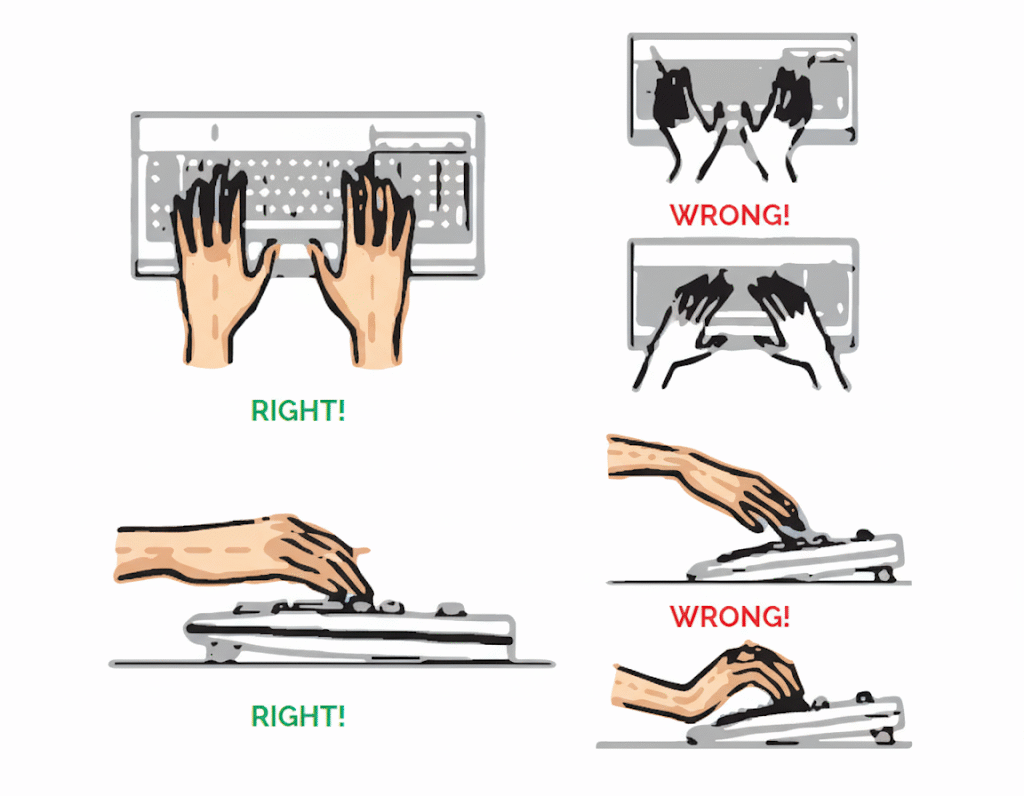
- Ulnar Deviation (The Outward Bend): A flat keyboard forces your hands close together, causing your wrists to bend outward to align with the keys. This constant, harmful angle puts stress on your tendons and is a major contributor to wrist pain.
- Wrist Extension (The Upward Tilt): Many people use the small pop-up feet on the back of their keyboards. This creates a positive tilt that forces your wrists to bend upwards. This extended position compresses the nerves and tendons inside the carpal tunnel, leading to fatigue and pain.
What to Look for in a Keyboard for Wrist Pain and Carpal Tunnel
An ergonomic keyboard directly solves the problems listed above. When you’re shopping, focus on these pain-relief features—they are the key to finding long-lasting comfort.
Split and Contoured Designs
This is the most visually distinct and impactful feature of any ergonomic keyboard. A split keyboard or contoured “wave” keyboard is designed to eliminate ulnar deviation. By splitting the keyboard into two separate halves or building it with a gentle curve, it allows you to position your hands shoulder-width apart.
- Pain-Relief Benefit: This split design keeps your wrists in a natural, straight line, preventing the painful outward twisting that standard keyboards cause. Studies have shown this significantly improves posture and reduces strain.
Tenting and Negative Tilt
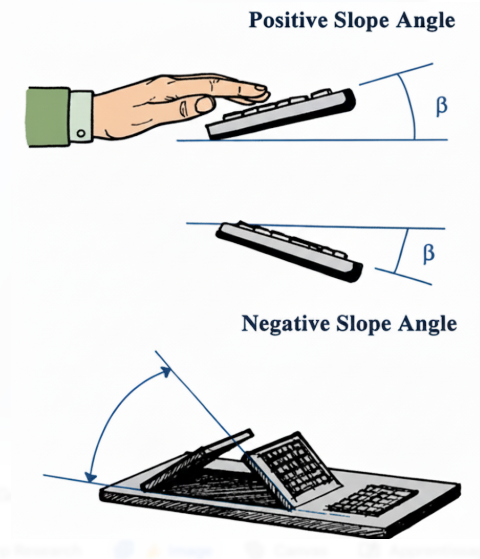
Tenting and negative tilt are advanced features designed to solve wrist extension.
- Tenting: This feature, found on most split keyboards, allows you to raise the inner edges of the keyboard halves. This creates a “tent” or “handshake” position, which is the most neutral hand position for your forearms.
- Negative Tilt: Instead of angling up, this feature lets the keyboard slope gently away from you. This prevents you from bending your wrists upward, keeping them straight and relaxed.
- Pain-Relief Benefit: Both tenting and negative tilt ensure your wrists stay in a neutral wrist position, alleviating pressure on the median nerve inside the carpal tunnel.
💰Save More with Our Discounts & Coupons!
- 1
- 2
- 3
- …
- 6
- Next Page »
Integrated Palm Supports and Cushioned Pads
A good ergonomic keyboard should support your hands even when you aren’t typing. A cushioned palm or wrist support is essential for this.
- Pain-Relief Benefit: An integrated palm support encourages you to maintain a neutral wrist position during pauses. It alleviates pressure on the sensitive tissues of your wrist and allows you to work comfortably for longer without fatigue.
The Right Key Switches (Mechanical vs. Membrane)
Are mechanical keyboards better for your hands? For many people with wrist pain, the answer is yes. The type of keyswitch makes a huge difference in the amount of force you use while typing.
- Mechanical keyboards require less force to activate a key, and their tactile feedback lets you know a keystroke has registered without having to “bottom out” or smash the key down. This lessens the impact on your fingers and can reduce fatigue.
- Membrane keyboards can feel mushy and may require a harder, more deliberate press to ensure a key is registered, which can increase finger strain over time.
- Pain-Relief Benefit: High-quality mechanical switches with light tactile feedback can significantly reduce finger impact and hand fatigue, which is crucial for anyone managing a Repetitive Strain Injury.
Do Ergonomic Keyboards Prevent Carpal Tunnel Syndrome?
This is the big question for many users. While no keyboard can be called a guaranteed “cure,” ergonomic keyboards are highly recommended by experts for both preventing and managing the symptoms of Carpal Tunnel Syndrome.
Conditions like CTS are caused by compression of the median nerve in the wrist. A proper ergonomic keyboard, by promoting a neutral wrist position with its split design and tenting, directly reduces this pressure. It is a critical part of a holistic approach to managing the condition and can provide substantial relief from pain, numbness, and tingling.
Popular Brands and Models for Wrist Pain
Finding the right keyboard is a personal journey, but these models are consistently praised for their ergonomic excellence:

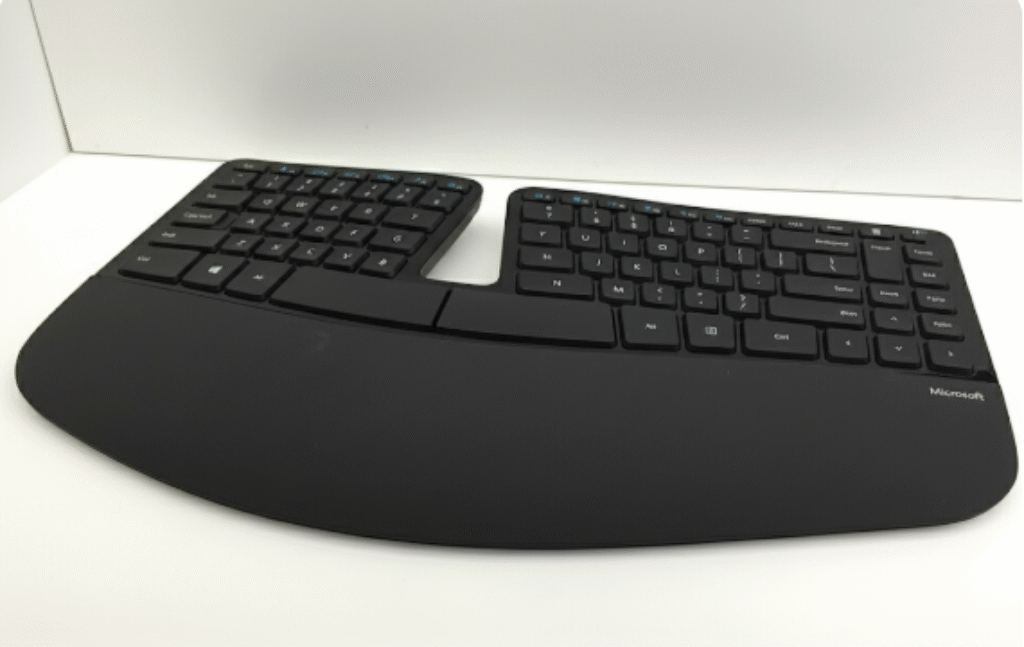
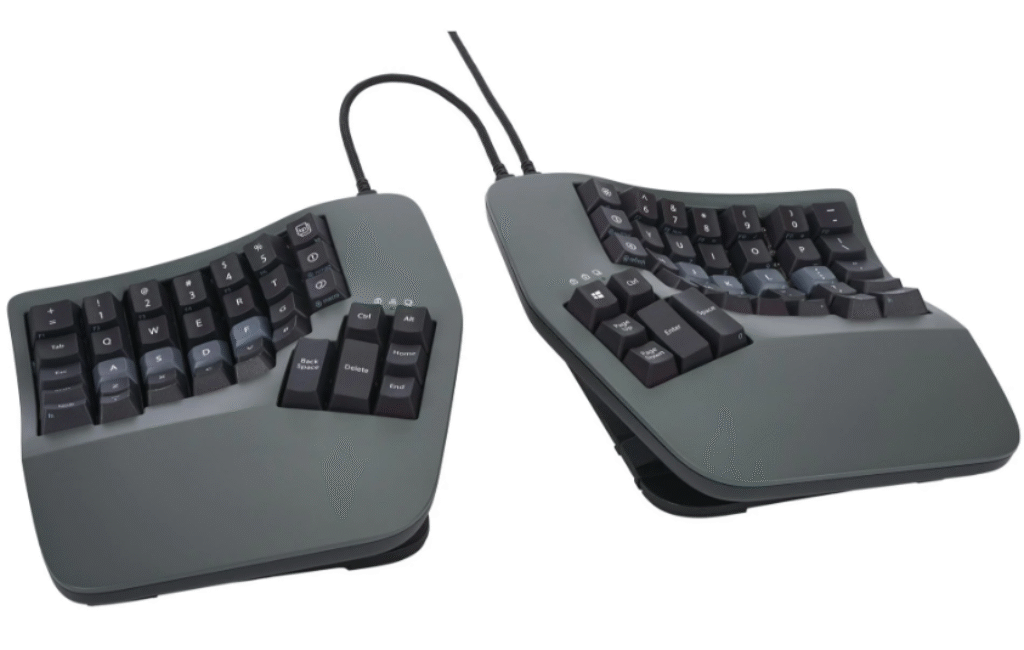
- Logitech ERGO K860 / Wave Keys: These single-piece curved keyboards are fantastic for beginners. They offer an immediate comfort boost with a gentle learning curve, making them an excellent first step into ergonomics.
- Microsoft Sculpt Ergonomic: A long-time favorite, the Sculpt features a domed, split layout and a separate number pad. Its unique shape is highly effective at reducing wrist strain.
- Kinesis Keyboards (Freestyle, Advantage): Kinesis is a leader in high-end ergonomics. Their fully split and tenting keyboards, like the Freestyle series, offer the maximum level of adjustability for users who need a perfectly tailored setup to manage chronic pain.
💰Save More with Our Discounts & Coupons!
- 1
- 2
- 3
- …
- 6
- Next Page »
Conclusion: An Investment in Your Health
Dealing with chronic wrist pain or the symptoms of Carpal Tunnel Syndrome is debilitating. A high-quality ergonomic keyboard isn’t just another accessory—it’s an investment in your long-term health, comfort, and ability to work without pain.
By understanding how features like a split design, tenting, and supportive palm rests work to create a neutral wrist position, you can confidently choose a keyboard that provides the relief you need. Don’t let a standard keyboard dictate your comfort; find an ergonomic solution that fits you.
Frequently Asked Questions (FAQ)
Yes, absolutely. Split keyboards are one of the most effective designs for alleviating wrist pain. They allow you to position your hands at a natural shoulder-width distance, which keeps your wrists straight and prevents the harmful outward bending (ulnar deviation) that is a major cause of strain.
Yes. Tendonitis is often caused by repetitive strain and overuse. An ergonomic keyboard helps manage this by reducing overall muscle and tendon strain in your hands, wrists, and forearms. By promoting a more relaxed and neutral hand position, it lessens the stress on inflamed tendons.
They are curved or split to match the natural position of your hands. Instead of forcing your hands to lie flat and close together, the curve allows your wrists and forearms to stay in a straight, neutral line, dramatically reducing muscle strain and improving comfort.