Is it worth repairing a laptop with a dead motherboard?
Generally, no. If the motherboard repair cost exceeds 50% of the laptop’s current resale value, it is considered a “total loss.” In modern ultra-thin laptops, components like RAM and CPUs are soldered directly to the board using Ball Grid Array (BGA) technology. While a modular RAM stick costs $50 to replace with a 100% success rate, a failure in soldered RAM usually requires a full motherboard replacement costing between $600 and $1,200, as professional “reballing” repairs have a high-risk success rate of only 70–85% due to metallurgical degradation.
The Hidden Economy of the “Soldered Trap”
A single microscopic crack in a solder joint shouldn’t render a $2,000 professional workstation obsolete. Yet, for millions of users in the “AI PC” era, a simple memory error now results in a “total loss” diagnosis. This phenomenon, known among technicians as the “Motherboard Tax,” is the direct result of the industry’s shift from modular SO-DIMM slots to Ball Grid Array (BGA) soldering.
This guide explores the economic and thermodynamic reality of modern laptop repair. While history shows that repeated small stresses—not just single massive impacts—destroy complex systems, modern electronics have made those stresses nearly impossible for the average user to fix. We will dive into the physics of Joule Heating, the metallurgical risks of the “Rebillage” gamble, and the data-driven “50% Rule” to help you decide if your dead laptop is a phoenix or a paperweight.
What is BGA Soldering and Why Does it Drive Up Repair Costs?
To understand the Motherboard Tax, we have to look at how your laptop is built. Traditional laptops used “sockets”—think of them like Lego blocks—where you could click a $50 RAM stick into place. Modern laptops use BGA (Ball Grid Array).
In a BGA setup, the memory chips are “reflowed” onto the motherboard using hundreds of tiny solder spheres (balls) about 0.4mm in diameter.
The “Activity Factor” and Thermal Stress
Science Fact: The power dissipated as heat in your motherboard is governed by the formula:
The Result: This constant switching creates Joule Heating, which causes the motherboard to expand and contract. Because the motherboard is a “sandwich” of copper and fiberglass, these materials expand at different rates, eventually snapping those tiny 0.4mm solder balls.
Alpha (Activity Factor): This is the killer. When you lack enough RAM, the “Activity Factor” spikes as the system frantically moves data between the SSD and RAM.
The Cost of Failure: Modular vs. Soldered
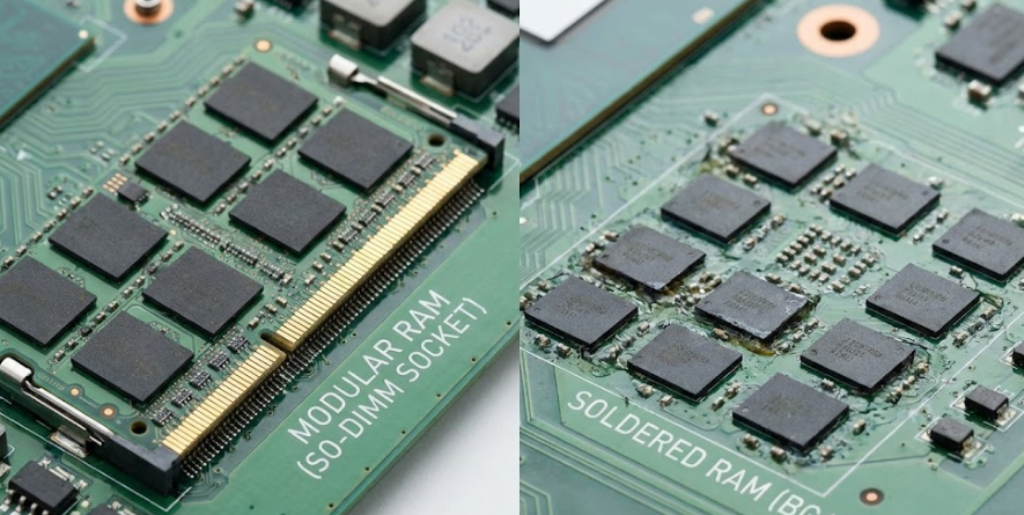
The high cost of a motherboard failure isn’t just the price of the silicon; it’s the Precision Labor Tax. Replacing a modular stick takes five minutes and a screwdriver. Repairing a soldered chip requires an infrared rework station and a technician who can manage “Thermal Transients” without melting the surrounding CPU.
| Feature | Modular (SO-DIMM) | Soldered (BGA/LPDDR5X) |
| Component Cost | $40 – $120 | $600 – $1,200 (Full Board) |
| Success Rate | 100% (Plug & Play) | 70% – 85% (Professional Repair) |
| Labor Intensity | Low (5 Minutes) | High (3–5 Hours) |
| Risk of Failure | Near Zero | High (Board Warping/Pad Cratering) |
Pro Tip: Most manufacturer service centers (Apple, Dell, Lenovo) refuse to perform component-level repairs. They only offer “Board Swaps.” If your RAM fails on a soldered board, they will charge you for a new CPU, new GPU, and new RAM all at once because they are physically inseparable.
The Science of “Rebillage”: Why Repair Success is Never Guaranteed
If you take your dead motherboard to a specialist, they may offer “Rebillage” (Reballing). This involves heating the failed RAM chip until the solder liquifies, removing it, cleaning the pads, and applying new solder balls.
While it sounds like a perfect fix, the physics of the motherboard often fight back.
The Problem of Metallurgical Degradation
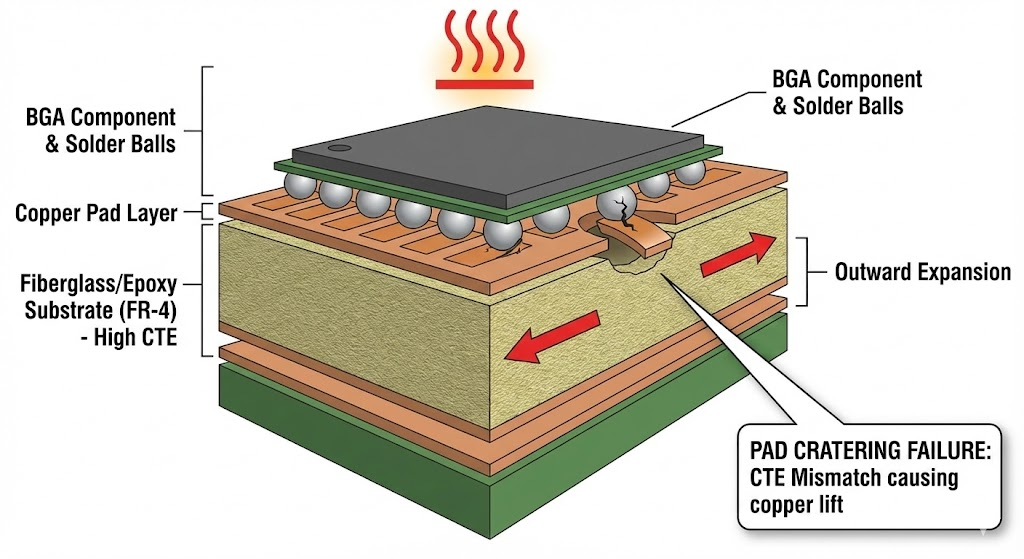
A motherboard is a “sandwich” of copper, fiberglass, and epoxy. During the intense heat of the reA motherboard is not a solid block; it is a composite of copper, fiberglass, and epoxy. During a repair, the board must be heated to roughly 217°C (the melting point of lead-free solder).
- TCE Mismatch: Different materials have different Coefficients of Thermal Expansion (TCE). Under the heat of a repair, the fiberglass may expand faster than the copper traces.
- Pad Cratering: The intense heat can cause the copper pads to physically rip off the board substrate. If one of the 500+ pads “craters,” the entire motherboard is permanently destroyed.
- Thermal Cycling Fatigue: Even if the repair is successful, the neighboring components (like the CPU) have been “heat-soaked,” which can shorten their remaining lifespan.
This is why, even with a $40,000 laser rework station, elite technicians generally cite a 70% to 85% success rate. Compared to the 100% success rate of a socketed RAM upgrade, the “Soldered Trap” is a high-stakes gamble.
The “CPU Tax”: Why Insufficient RAM Kills the Motherboard
The academic report reveals a shocking connection: Running out of RAM physically wears out your motherboard joints. When your RAM is full (a “16GB bottleneck”), the CPU triggers a Hard Page Fault. This isn’t just a software lag; it’s a high-energy hardware event.
- The Interrupt Storm: The CPU stops all work and executes a “Hardware Trap.” This costs roughly 1,200+ cycles of pure energy.
- The Heat Spike: During this “thrashing” period, the CPU and SSD are locked in a high-power exchange. The local temperature around the RAM chips can spike toward the 85°C threshold, where thermal expansion becomes aggressive.
By choosing 32GB of RAM, you provide a “thermal buffer.” The system stays in a low-power state, the “Activity Factor” remains low, and the solder joints are spared the “fatigue cycles” that lead to motherboard failure.
Why Do Manufacturers Use the BGA Architecture Anyway?
If it’s so expensive to fix, why has the industry moved away from upgradeable sticks? It isn’t just about planned obsolescence; it’s about Signal Integrity.
- Extreme Speeds: Modern LPDDR5X memory operates at speeds up to 10.7 Gbps. At these frequencies, even a few millimeters of distance between the RAM and the CPU can cause data corruption. Soldering them directly allows for “short-run” traces.
- Thin Designs: Sockets add about 3mm to 5mm to a laptop’s height. BGA allows for the razor-thin profiles consumers demand.
- Power Density: Soldered memory allows for 3D-stacked architectures, where memory is layered on top of other chips to save space, though this significantly increases the difficulty of cooling the “Thermal Halo” created by the PMIC (Power Management Integrated Circuit).
Frequently Asked Questions (FAQ)
Mathematically, no. This is the “50% Rule.” If the repair costs more than half of what the laptop is worth on eBay, you are better off selling the broken unit for parts and investing that $600 into a new machine with 32GB of RAM to prevent a repeat failure.
Technically, yes, but practically, no. It requires a professional technician to “swap” the chips and then modify the BIOS to recognize the new capacity. It is a high-risk procedure that most shops will not perform because the success rate is too low.
Yes. Modern laptops use Lead-Free (RoHS) Solder, which has a higher melting point and is more “brittle” than old-fashioned leaded solder. This makes modern motherboards more prone to cracking under thermal stress and harder to repair reliably.
That “hot spot” is often the PMIC (Power Management Integrated Circuit) on the motherboard. If you have low RAM, the PMIC is working overtime to switch voltages for the constant paging operations. Upgrading to a 32GB system keeps these “Thermal Transients” to a minimum.
LPCAMM2 is a new modular memory standard. It offers the speed of soldered RAM with the modularity of old RAM sticks. If you are worried about repairability, look for laptops adopting the LPCAMM2 standard in 2025 and 2026.
Conclusion: Navigating the Repairability Cliff
TThe transition to soldered hardware has redefined the laptop as a single-point-of-failure device. While BGA architecture enables the thin, powerful “AI PCs” we use today, it imposes a significant financial risk. When the RAM fails, the whole board dies.
To protect your investment and avoid the Motherboard Tax:
- Follow the 50% Rule: Don’t let sentimentality drive your repair decisions. If the motherboard is dead, sometimes the most “pro” move is to walk away.
- Buy the RAM you need today: Since upgrades are effectively impossible and repairs are a 70% gamble, 32GB is the “safe” baseline for 2026.
- Manage the Thermal Floor: Use a laptop stand. Lowering your internal temperatures by even 5°C can exponentially extend the life of those delicate solder joints.